Yes, you can call on WhatsApp Web. WhatsApp added free voice and video calls to it on , one-to-one or in groups of up to 32, in an ordinary browser tab with nothing to install [1][2]. The rollout is gradual, so the call button may still be missing on your account [3]. Calls connect WhatsApp users and guests who open a call link; I found no WhatsApp page that offers calls to landlines or ordinary mobiles.
Key facts
Web calling launched on ; on WhatsApp's help still said it 'may not be available to you yet' [3].
Minimum browsers: Chrome and Edge 100, Firefox 115, Safari 15, Opera 86, on Windows, Linux or macOS (checked ) [4].
Since , people without a WhatsApp account can join a call link from a desktop browser once the host admits them [5][6].
Web calls are free and end-to-end encrypted [1], but WhatsApp can't reach emergency numbers such as 911 (checked ) [2].
Can you call on WhatsApp Web now?
Yes, once the feature reaches your account. WhatsApp announced voice and video calls in WhatsApp Web on , one-to-one and group, with 'no app download required' [1]. Its help centre still says the feature is rolling out gradually [3]. Calls are free and connect only WhatsApp accounts and their link guests.
What WhatsApp Web calling includes, according to WhatsApp's own pages
Feature
In WhatsApp Web
The catch
One-to-one voice and video
Yes: open a chat, click Call, pick Voice or Video [7]
Video needs a camera, and there is no auto-answer [8]
No calling page I read offers landlines or non-WhatsApp mobiles [7]; 911 is excluded [2]
From the Web tab of WhatsApp's help centre and its blog, read on .
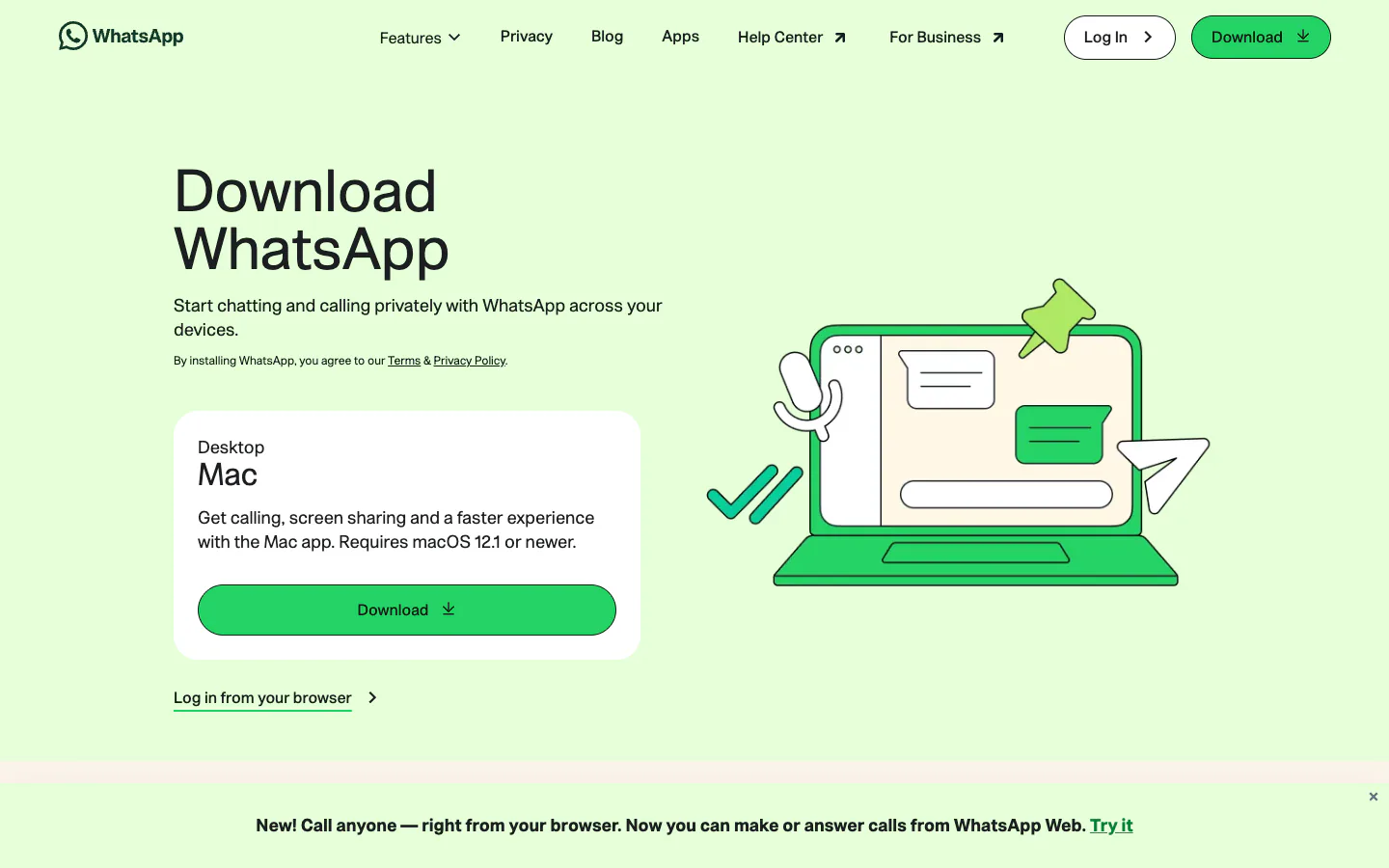
On I opened web.whatsapp.com in Chrome, logged out: it showed a QR code and a banner pushing the Mac app for calls, while the download page announced 'Call anyone — right from your browser' [10]. I did not log in, so the steps below come from WhatsApp's help pages, not from a call button I saw.
WhatsApp's download page on , with a banner about calls from WhatsApp Web. Screenshot of WhatsApp's website, captured November 1, 2026. Trademarks belong to their owners.
How do you make a WhatsApp call from a browser?
Link WhatsApp Web to your phone once, then call from any chat. Go to web.whatsapp.com and scan the QR code with the WhatsApp app [11]. Then open the chat with the person you want, click Call and choose Voice or Video [7]. The browser asks for your microphone, and for the camera on a video call [8].
Open web.whatsapp.com in a current Chrome, Edge, Firefox or Safari on Windows, macOS or Linux [3].
On your phone, open WhatsApp and follow the on-screen steps to scan the QR code [11]. The account itself must already be registered with a mobile number [12].
Plug in a headset if you have one: WhatsApp warns that a separate external microphone and speakers can cause echo [7].
Open the one-to-one chat, click Call, then Voice or Video[7].
When the browser asks, let web.whatsapp.com use the microphone, the camera and notifications [13].
During the call, the microphone icon mutes you and End call hangs up [7]. The camera icon asks the other person to switch to video, which they accept or decline [8].
Answering a call in the tab
An incoming call appears as a notification with Accept and Decline[7]. Allow notifications for web.whatsapp.com, which WhatsApp lists among the checks when calls don't come through [13].
Video calls on a laptop
A video call needs a camera, a microphone and an audio output; WhatsApp says video calling isn't supported on a device without a camera [8]. From the call menu you can send an emoji, share your screen or add people [8].
How do group calls work on WhatsApp Web?
Group voice and video calls in the browser take up to 32 people [2][9]. You can start one from a group chat, from the Calls tab, or by adding people to a one-to-one call. Only members of a group can take part in its group call [2]; anyone else needs a call link.
Bigger groups: if the group has more than 32 members, you select up to 31 people to ring [9].
Late joiners: a missed group call that is still going can be joined from the Calls tab or from the group chat [2].
Muting: you can mute another participant, who can unmute at any time; on video, someone who unmutes can't be muted again for 30 seconds [2][9].
Removing people: you can't remove anyone from a group call started from a chat; they have to leave [2][9]. In a call started from a link, the link's creator can remove people [6].
How do WhatsApp call links work in a browser?
A call link lets anyone you send it to join your call, whether you share it in WhatsApp or paste it elsewhere; in WhatsApp Web you create one from the Calls tab [6]. Since , people with no WhatsApp account can open the link in a computer browser, type a name and wait to be admitted. Only a WhatsApp user can create the link [5].
Choose Voice or Video, and switch on Require approval to join if you also want to vet WhatsApp users [6].
Copy the link, or click Send link via WhatsApp. Each link is a new, hard-to-guess URL, but anyone who has it can join, so WhatsApp advises sharing it only with people you trust [6].
Join as a guest without WhatsApp
Guests need Chrome, Safari, Firefox or Edge on a desktop [14] and always wait for approval, whatever the host's setting [6]. They show up as their name plus '(Guest)', with audio, video, screen sharing and reactions, but can't send messages, add people or see participants' phone numbers [6][5].
'No Time Limit' in the announcement's headline [5]; 'until 60 minutes have passed' on the Web help page [6]
Read on .
WhatsApp Web or the desktop app: which should you call from?
Both make the same calls. WhatsApp Web needs nothing installed, which WhatsApp pitches at shared computers and work laptops that block app downloads [1]. The desktop apps need Windows 10 64-bit, version 1903 or newer, or macOS 12.1 or newer [15][16], and WhatsApp's troubleshooting page suggests them when web calls fail [13].
Calling from WhatsApp Web, WhatsApp for Windows and WhatsApp for Mac
Messages still arrive; call alerts even with the app closed [16]
From WhatsApp's help centre, read on .
My rule of thumb: use the tab on a borrowed or locked-down computer, on Linux, or for a one-off call; install the app on your own PC or Mac if you call often or web calling hasn't reached you yet. To ring ordinary numbers from the same machine, see calling from a computer.
Which browsers support WhatsApp Web calls?
WhatsApp's browser page sets minimum versions: Chrome 100, Edge 100, Firefox 115, Safari 15 and Opera 86, on Windows, Linux or macOS [4]. The calling overview names only Chrome, Edge, Safari and Firefox, and warns that certain versions may not be supported [3]. Internet Explorer doesn't work with WhatsApp Web at all [17].
From WhatsApp's help centre, read on . 'Not listed' means WhatsApp doesn't name the browser, not that it fails.
WhatsApp describes WhatsApp Web as a desktop-browser service [11], so phones and tablets should use the app. ChromeOS is not on its list of systems for web calling [3], and I found no official word on Chromebooks.
Why can't I call on WhatsApp Web?
Most often because the feature hasn't reached your account: WhatsApp says web calling is rolling out gradually and may not be available to you yet [13]. If the call icon is there but calls fail, the usual causes are a missing browser permission, an outdated browser or a network that blocks WhatsApp's calling ports. Work through these checks in order.
Refresh the page, or close and reopen the WhatsApp Web tab [13].
Update the browser to a recent version [13]; the minimums are in the table above.
Check permissions: web.whatsapp.com needs the microphone, camera and notifications, and the operating system must let the browser use them and share the screen [13].
Close other apps that hold the microphone or camera, and turn off virtual audio or camera devices [13][19].
Try another Wi-Fi network. On an office network, ask the admin to open UDP and TCP ports 3478, 3480 and 443 (the video article says 3484 instead of 443) [13][19].
If the other person shows as unavailable, they may have blocked you, have Do Not Disturb on, or be offline [13].
Still stuck: use WhatsApp for Windows or Mac, the fallback WhatsApp suggests [13].
What can't a WhatsApp Web call do?
It can't leave WhatsApp. Every calling page I read describes calls to WhatsApp contacts or to link guests [7][5], and none offers a way to ring a landline or a mobile without WhatsApp; emergency numbers are excluded outright [2]. Starting a call also needs a WhatsApp account registered with a mobile number [12]; only guests skip that.
Landlines and ordinary mobiles: I found no WhatsApp page that offers calls to phone numbers outside the app, free or paid. Why, and what people use instead, is in my answer on WhatsApp and landlines.
911 and other emergency numbers: WhatsApp's help says you can't reach emergency service numbers through WhatsApp, giving 911 in the United States as the example [2][12]. Keep a phone line for emergencies; for 911 and 112 over the internet in general, see what reaching 911 from a computer involves.
Calls abroad: a web call to a WhatsApp user in another country is free, like any WhatsApp call [3]. The international side, including what can still cost money, is in my guide to calling abroad on WhatsApp.
Privacy: personal calls, web calls included, are end-to-end encrypted [20][1]. Guests who join by link can't see participants' phone numbers [5].
What to use when the other person isn't on WhatsApp
Match the tool to what the other person has. Google Meet and Microsoft Teams (free) also make free calls in a browser tab, but only between their own users [21][22][23]. Telegram calls are free too [24], though I found no Telegram page about calling from its web version. If the person only has a phone number, you need a service that connects to the phone network and charges per minute, or Google Voice in the US.
On a phone, scroll the table sideways to see every column.
The row order is not a ranking. All four help only if the other person is on the same service; for the wider set of no-cost options, see which online calls are really free.
To reach a landline or a mobile
Three services I compared call real numbers from a tab. Google Voice is available only in the US and checks new users' ID [30][31]. TwinPhone needs only an email or Google account and runs in Chrome, Edge, Firefox, Brave and Safari [32]. Yolla asks for your phone number and shows it as your caller ID [33][34].
Google Voice
Google's free US number with browser calls, available in the US only
Best for: People in the US who want a free number and free US and Canada calls in a browser
Pros
Free US number; calls from the US to most US and Canada numbers cost nothing
Low published international rates, paid from prepaid credit
Incoming calls ring in the browser while the tab is open
Officially supports Chrome, Edge, Firefox and Safari
Cons
Personal accounts work only in the US
New numbers need a phone number for a text code and a government ID check
No emergency calls on the free plan
Credit is sold in US dollars only, and the balance is capped
Price: US and Canada calls from the US mostly free[35]; India $0.02/min[36]
TwinPhone sponsors this site, so here are its weak points. It has no free tier, and the first call needs a top-up of $10[41][38]. UK mobiles cost $0.12 a minute against Yolla's from $0.10, and India $0.08 against from $0.0239[37][42][40]. It can't call 911, and rented numbers exist only for the US, Canada and Puerto Rico [41][43].
Its pages also disagree on reach: 145+ countries on the calling page, 165 destinations on the rates page [32][37]. TwinPhone's own comparison with WhatsApp and Viber is a vendor page, but it draws the same line as this one: WhatsApp for people on WhatsApp, a paid dialer for phone numbers. Scores for all of them are in every service I compared, side by side.
WhatsApp calls abroad are free between two WhatsApp accounts, on a phone or a laptop. I list what you still pay for: data, roaming and non-WhatsApp numbers.
WhatsApp can't call landlines or numbers without WhatsApp, on a phone or in a browser. I read its help pages and compare services that can, checked Nov 2026.
Frequently asked questions
Are WhatsApp Web calls free?
Yes. WhatsApp says web calls are end-to-end encrypted, with no time limits and at no cost [1], even to contacts in other countries; they run on your own internet connection [3]. One caveat: WhatsApp's help page on call links says a call that includes guests ends once 60 minutes have passed [6].
Do I need my phone to make a WhatsApp call from my computer?
You need it once, to scan the QR code that links WhatsApp Web to your account [11]. After that the help pages differ: the one-to-one voice article asks for an internet connection on both the computer and the phone [7], while the video and overview articles mention only the computer [8][3]. I would keep the phone online to be safe.
Can I make a WhatsApp video call on a laptop without installing anything?
Yes, in WhatsApp Web on Windows, macOS or Linux, once web calling has reached your account [3]. Open the chat, click Call, then Video [7]. The laptop needs a working camera and microphone; WhatsApp says video calling isn't supported on a device without a camera [8].
Can someone without WhatsApp join my call?
Yes, through a call link you create in the Calls tab [6]. The guest opens it in Chrome, Safari, Firefox or Edge on a computer, types a name and waits for you to admit them [14][5]. Guests can talk, use video and share a screen, but can't send messages [6] or see other participants' phone numbers [5].
How many people can join a WhatsApp Web call?
Group voice and video calls in WhatsApp Web take up to 32 people [2][9], and the guest-calling announcement also says 32 [5]. WhatsApp's call-link troubleshooting page, though, gives 256 as the most people who can join a link [14]. For more than 32, I would not count on it without trying the link first.
Can I use WhatsApp Web calls in a phone's browser?
WhatsApp presents WhatsApp Web as a service for desktop browsers [11], its web-calling page lists only Windows, Linux and macOS [3], and guests joining a call link are told to use a desktop browser [14]. On a phone or tablet, the WhatsApp app is the supported way to make and take calls.
Can I call 911 from WhatsApp Web?
No. WhatsApp's help says you can't reach emergency service numbers through WhatsApp, such as 911 in the United States [2], and its terms exclude access to emergency services [12]. That applies to the phone app, the desktop apps and WhatsApp Web alike. Keep a mobile or landline within reach for emergencies.
What does the other person see when I call from WhatsApp Web?
WhatsApp doesn't spell this out for web calls. The call comes from your WhatsApp account, which is registered to your mobile number [12], so a contact should see you as on any WhatsApp call, though I could not confirm it. Guests who join by link can't see other participants' phone numbers [5].
Is a WhatsApp Web call a VoIP call?
Yes, in the plain sense: WhatsApp says web calling uses your internet connection [3], and the call stays between WhatsApp accounts instead of entering the phone network. That is why it costs nothing. A service that rings landlines has to hand the call over to the phone network, which is where per-minute charges come from.
Can I move a WhatsApp call from my phone to my computer?
Yes, if both devices are linked to the same account. WhatsApp's voice-call help says you can transfer a call to another linked device during the call [7], and the July 2026 announcement describes moving an active group call from a phone to WhatsApp Web or Desktop and back, as part of a gradual rollout [1].
Ask an AI about this page
Each link opens the assistant in a new tab with this page's address in the question.